
Is Google Workspace CMMC Compliant? Here's What Actually Qualifies
Last updated
The Short Answer
Yes. Google Workspace can be used to meet NIST SP 800-171 requirements for Controlled Unclassified Information (CUI) in order to achieve CMMC Level 2 certification, if configured correctly. But no software product is "CMMC compliant" on its own. CMMC certifies organizations, not tools. A cloud platform's job is to meet the requirements CMMC depends on, so a contractor supporting the Department of War (DoW) can build a certifiable environment on top of it.
Google Workspace clears that bar, and Google publishes the evidence. Google Workspace can meet CMMC requirements at every level when you use its FedRAMP High authorized services. (Google Cloud, CMMC). In June 2026, Kratos, an authorized C3PAO, reviewed Workspace's FedRAMP High documentation and evidence against all 110 CMMC Level 2 security requirements and attested that Workspace meets them (Kratos attestation letter). That letter covers Google's platform, not your company, and it isn't a CMMC certificate.
What actually qualifies is a configured Workspace environment: FedRAMP High authorized services only and the customer-side controls Google leaves to you.
Contractors don't have to build that environment from scratch. ATX Defense's CMMC Space is a Google-based CMMC enclave that's already built and assessed to this standard. More than 120 companies have earned CMMC Level 2 certification on it, assessed by 12 different C3PAOs.
Why do defense contractors think Google Workspace isn't compliant?
Two misconceptions keep this myth alive:
1. "Commercial platforms aren't sufficient for government data." For years, the defense industrial base (DIB) has been told CUI belongs in a parallel government cloud, licensed and priced separately from commercial products. We call this the "govcloud" model. Google doesn't have a separate "govcloud" product because Google Workspace (the same Gmail, Drive, and Docs your dry cleaner uses) holds a FedRAMP High authorization from the Joint Authorization Board and a DoD Impact Level 4 provisional authorization for CUI. The environment built for billions of consumers and the environment the government trusts for its most sensitive unclassified data are the same environment, because the security was built into the foundation instead of sold as an upgrade. However, buyers trained on the govcloud model read that absence as "not approved."
2: "CMMC requires Microsoft." Our sales team talks to people every day who have heard “there's no Google option for CMMC” or “only Microsoft GCC High can handle CUI.” This is simply not true. Both Google Cloud and Google Workspace hold FedRAMP High Authorization and support CMMC, including ITAR data.
When wrapped with additional controls, like Google Assured Controls Plus, virtual desktop/mobile infrastructure, and a managed CMMC environment, Google Workspace can support organizations through CMMC Level 2 self-assessment or third-party (C3PAO) certification.
Where CMMC Space fits
CMMC Space is ATX Defense's CMMC enclave, built on Google. It's the qualified configuration described above, already built, documented and assessed, and its track record is real-world evidence that the Google path holds up under assessment. More than 120 businesses have earned CMMC Level 2 certification on CMMC Space. Eleven different independent C3PAOs ran those assessments, and every client passed. The enclave covers 307 of the 320 Level 2 assessment objectives. The remaining 13 stay with your organization, and we tell you exactly which ones.
- FedRAMP Moderate equivalent. CMMC Space itself has achieved FedRAMP Moderate equivalent status, the DFARS 7012 bar for cloud providers.
- Transparent, affordable pricing. Starting at $299 per user per month, without a $150,000 consulting engagement attached.
Can small defense contractors use Google Workspace for CMMC Level 2?
Google Workspace isn't a lesser or unofficial path to CMMC Level 2. It's a fully valid one, provided it runs through the FedRAMP-authorized tier with the right architecture around it. For smaller defense contractors especially, it's often a faster and lower-cost way to reach compliance than a traditional Microsoft GCC High migration, without giving up any of the actual security or assessment requirements.
| Defense contractor situation | Will Google Workspace work for you? |
|---|---|
| Staff handle CUI in email, files and documents. | Yes. A Google-based enclave like CMMC Space is the lowest-cost path to CMMC Level 2. |
| You handle ITAR or export-controlled technical data. | Yes, with Google Workspace client-side encryption or Assured Controls Plus licenses. |
| Your prime works in Microsoft Teams and Office. | Yes. Add web-based Microsoft 365 GCC High for collaboration and keep CUI in the enclave. |
| CUI lives in desktop CAD files (AutoCAD, Bluebeam). | This capability doesn't exist in CMMC Space today, but we're working on a solution. Contact us to discuss. |
| CUI sits on CNC machines, on-premises servers or job-site printers. | Plan for a hybrid environment for these assets. |
Is Google Workspace ITAR compliant?
Google Workspace can accommodate CUI Specified - Export Controlled (CUI/SP-EXPT) data, including International Traffic in Arms Regulations (ITAR) data, governed by the Department of State's Directorate of Defense Trade Controls (DDTC), and Export Administration Regulations (EAR) data, overseen by the Department of Commerce’s Bureau of Industry and Security (BIS).
Google’s ITAR compliance is achieved through Client-Side Encryption (CSE), which is available exclusively with Google Workspace Enterprise Plus. CSE allows customers to manage their own encryption keys, ensuring that no third party, including Google, has access to them. This meets ITAR’s requirements for end-to-end encryption in scenarios involving exports, reexports, re-transfers, or temporary imports (see 22 C.F.R. 120.54(a)(5))—particularly when data leaves the United States or is accessed by a non-U.S. citizen.
However, Google’s current Workspace Terms of Service (TOS) prohibit the use of Workspace for “materials or activities that are subject to the International Traffic in Arms Regulations (ITAR) maintained by the United States Department of State.” Acknowledging this discrepancy, Google is actively working on a permanent solution. In the meantime, customers can request a modification to the TOS to remove the ITAR prohibition, which requires working through a reseller (e.g., ATX Defense) rather than purchasing directly from Google.
It’s important to note that while CSE provides robust security, it does come with some trade-offs, such as a degraded user experience with CSE-encrypted files, since Google cannot access the underlying data. Nevertheless, CSE can be selectively applied to specific files that require heightened protection.
Alternatively, or in conjunction with CSE, customers using Google Workspace Enterprise Plus can add Assured Controls Plus, which restricts Google staff support actions to U.S. persons only. According to 22 C.F.R. 120.54(a)(2), “transmitting or otherwise transferring technical data to a U.S. person in the United States from a person in the United States” is not considered an “export, reexport, retransfer, or temporary import.” Therefore, customers using Google Workspace Enterprise Plus with Assured Controls do not require CSE to comply with ITAR.
What are the limitations of Google Workspace for defense contractors pursuing CMMC compliance?
To be compliant, your cloud environment must meet 110 controls, broken down into 320 objectives, defined in NIST SP 800-171. No single cloud solution can satisfy all those requirements, including Google Workspace. Here’s an overview of how responsibility is covered:
| Responsibility area | What Google handles | What your organization handles |
|---|---|---|
| Infrastructure and endpoints | Data centers, physical security and platform hardening | Every laptop, phone and printer that touches CUI |
| Identity and access | MFA, SSO and access controls are available | Enforcing them, deciding who can reach CUI and reviewing access |
| Logging | Audit logs are generated | Retaining them at least 90 days for DFARS 7012, and reviewing them |
| Incident reporting | Notifies you of incidents on Google's side | Reporting to DoD through DIBNet within 72 hours |
| Documentation | Google's own System Security Plan and responsibility matrix | Your own SSP, policies, training and evidence for assessors |
Beyond concerns about shared responsibility, there are a few limitations worth considering:
No built-in endpoint detection and response. True. A whole-company build has to add a third-party tool to every device. An enclave keeps CUI off everyday devices, so that protection covers one managed environment instead of every laptop.
Office desktop add-ins. Browser-based Office doesn't run every Outlook or Office plug-in. Firms that depend on one should test it before moving to Google.
Interoperability challenges with Microsoft-based primes. This is the most common concern we hear about when we’re talking to potential customers, and it’s legitimate. The DIB runs heavily on Microsoft, and no small business can afford to be unreachable by its prime or its government customer.
Fortunately, CMMC Space clients can get web-based Microsoft 365 GCC High for under $200 per user per year so they can join the Teams call, open the Office attachment, and work with whoever the mission requires, while their CUI lives inside a secure and compliant environment.
No encrypted message capability. CMMC compliance does not require end-to-end encrypted email. Nevertheless, many companies in the DIB need a way to send and receive S/MIME encrypted messages and you can’t do this in a standard Gmail set up. CMMC Space users, however, can send and receive encrypted, signed email with government contacts directly from Gmail. Learn more about this capability here.
“Migrating” to Google Workspace for CMMC vs. Microsoft 365
Migrating between Google Workspace editions (e.g., from Business Standard to Enterprise Plus) or adding Assured Controls Plus is seamless, with no need for data migration or service disruption. This contrasts sharply with Microsoft’s approach, which requires complex migrations when moving from its Commercial edition to GCC or GCC High. Such migrations can require re-registering devices, re-enrolling in MDM, reconfiguring encryption technologies, and more.
Additionally, unlike Google, Microsoft does not provide an attestation of compliance with DFARS 7012 requirements for its Commercial editions, which is why they may steer customers toward the GCC High edition ($1,150/user/year), even when their needs might be better served by a less costly option. Leading Microsoft resellers recommend GCC High for any level of CMMC compliance, with Microsoft officially stating that organizations planning or required to meet CMMC 2.0 Levels 2 and 3 should deploy Microsoft 365 GCC High. They further emphasize that their "exclusive recommendation" for protecting CUI in alignment with CMMC 2.0 Levels 2-3 is Microsoft 365 Government (GCC High) and Azure Government.
In contrast, neither Google nor ATX Defense advises purchasing a Google Workspace edition beyond what is necessary for business operations. Customers without ITAR or similar requirements should consider starting with Google Workspace Enterprise Plus, which offers advanced features like the full Security Investigation Tool and the ability to export audit data to a SIEM. For those handling export-controlled data or requiring U.S. sovereignty, Assured Controls Plus can be added without any migration or downtime.
This tiered approach could result in significant savings. For example, a 100-person company could save 70% with Google Workspace compared to Microsoft’s “all-in” approach.
| Platform | Users | Price per user per year | Annual cost |
|---|---|---|---|
| No ITAR or other data sovereignty requirements | |||
| Google Workspace Enterprise Plus | 100 | $360 | $36,000 |
| Microsoft 365 GCC High | 100 | $1,150 | $115,000 |
| ITAR or other data sovereignty requirements | |||
| Google Workspace Enterprise Plus with Assured Controls Plus | 100 | $720 | $72,000 |
| Microsoft 365 GCC High | 100 | $1,150 | $115,000 |
GCC High is used instead of GCC for this comparison based on recommendations from Microsoft and its resellers.
The bottom line
Google Workspace is a legitimate path to CMMC Level 2, not a workaround. It holds the same FedRAMP High authorization the government relies on. What separates a compliant environment from a risky one is configuration, scope and the controls that stay with you, not the logo on the login screen.
For most small and mid-sized defense contractors, the most practical route to compliance is a managed enclave that keeps CUI in one assessed environment while the rest of the business runs as it does today. That's what CMMC Space delivers.
Ready to see where you stand? Book a CMMC Space intro call. We'll map which of your systems actually need to be in scope, tell you honestly whether CMMC Space fits, and walk you through pricing.
Still weighing Google against GCC High? Read The Architecture Decision Hiding Under CMMC's Price Tag.
Frequently asked questions
Is Google Workspace CMMC compliant?
Yes, Google Workspace can be used to meet CMMC Level 2 requirements for CUI when it's configured correctly, but no product is CMMC certified on its own, because CMMC certifies organizations, not software. Google states that Workspace supports CMMC at every level when you use its FedRAMP High authorized services, with Assured Controls Plus keeping data stored only in the United States (Google Cloud, CMMC). In June 2026, Kratos, an authorized C3PAO, attested that Google Workspace meets all 110 CMMC Level 2 security requirements (Kratos attestation letter). Your organization still needs its own controls in place and a passed C3PAO assessment to earn certification.
Is Google Workspace NIST 800-171 compliant?
Yes, at the platform level. CMMC Level 2 is built on the 110 security requirements in NIST SP 800-171, and a June 2026 attestation from C3PAO Kratos found that Google Workspace meets all 110 (Kratos attestation letter). Your organization still has to implement its own side of those requirements, including policies, training, endpoint security and incident reporting.
Is Google Workspace FedRAMP authorized?
Yes. Google Workspace maintains FedRAMP High authorization for defined services. FedRAMP High exceeds the FedRAMP Moderate equivalency that DFARS 252.204-7012 requires.
Can I store CUI in Google Drive or send it in Gmail?
Yes, in a properly configured tenant. Gmail, Drive, Docs, Sheets, Slides, Calendar, Chat, Forms and Meet are covered by Google's FedRAMP High authorization. Use Enterprise Plus or Frontline Plus, a U.S. data region, and turn off services outside the authorized list.
Do I need a separate secure email system for CMMC compliance?
No, as long as the email system you already use is inside a compliant environment. CMMC requires email carrying CUI to run on a service that meets DFARS 7012's FedRAMP Moderate equivalency, and to be protected in transit with FIPS-validated encryption (NIST SP 800-171 requirements 3.13.8 and 3.13.11). Gmail in a properly configured Google Workspace tenant can meet both. Encrypting a message doesn't change the rule: DoD's CMMC FAQ states that encrypted CUI is still CUI. CMMC doesn't require end-to-end encrypted email, but some government contacts require S/MIME signed and encrypted messages. CMMC Space users can send and receive S/MIME directly from Gmail with a $199 per user per year add-on (learn more).
Does Google Workspace meet DFARS 7012?
Yes, for the cloud provider requirements. Google commits to the DFARS 7012 flowdown obligations for its FedRAMP Moderate and High services. You still own your NIST SP 800-171 controls and your incident reporting to DoD.
Do I need Microsoft GCC High for CMMC?
No. CMMC, NIST SP 800-171 and DFARS don't require any vendor. Many contractors need to work with Microsoft-based primes, which a browser-based GCC High license can handle without moving your CUI.
What is a CUI enclave, and do I need one for CMMC?
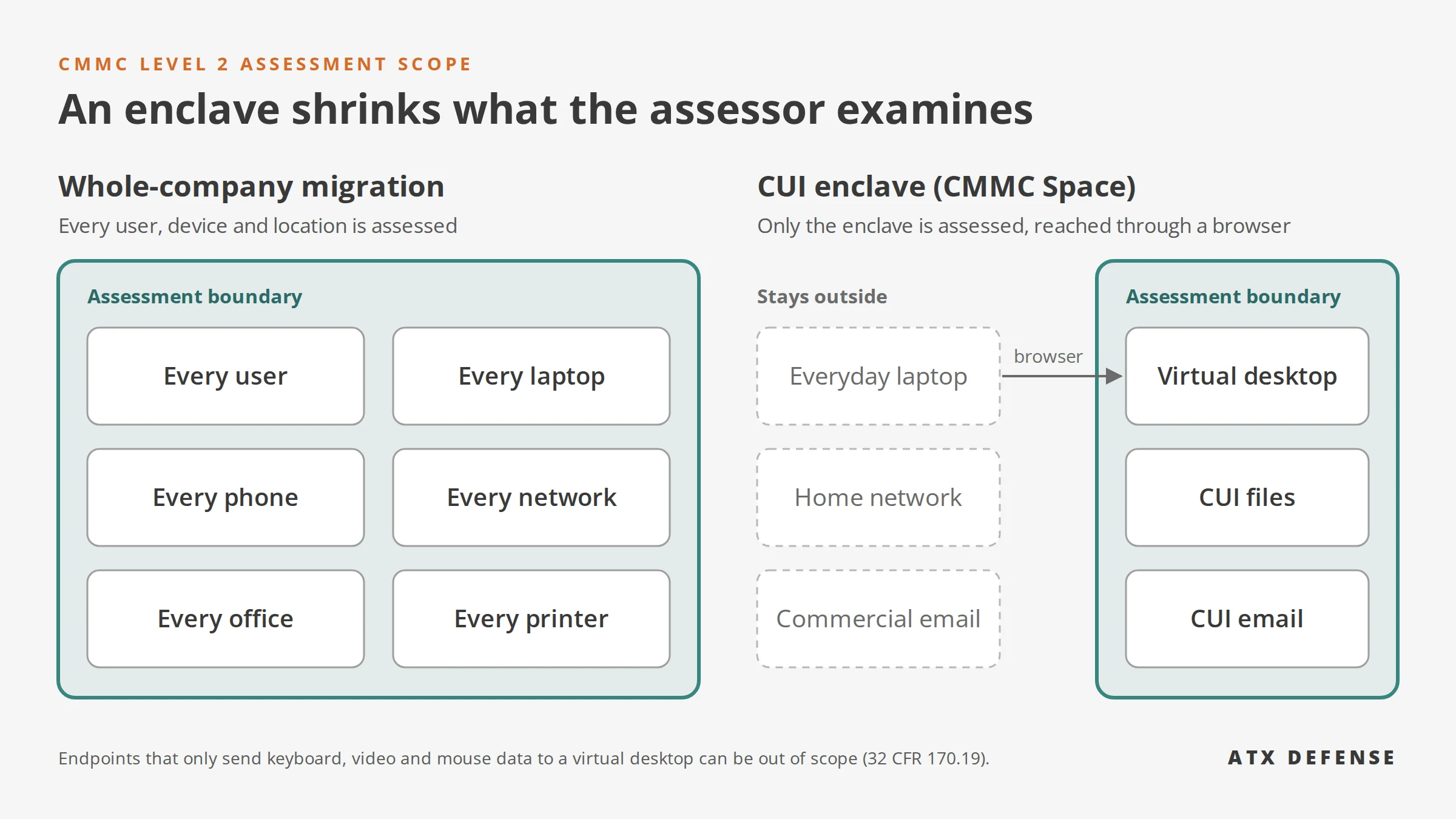
A CUI enclave is a separate, secured environment where all work involving Controlled Unclassified Information happens, walled off from the rest of your IT. Only the enclave and the systems that support it fall within your CMMC assessment scope, rather than every user, device and network in the company. CMMC doesn't require an enclave. For most small and mid-sized contractors, though, it's usually the lowest-cost route to Level 2, because only the employees who handle CUI work inside it. ATX Defense's CMMC Space is a Google-based enclave built this way.
Can employees use personal laptops in a CMMC Level 2 environment?
Yes, if CUI never lands on the laptop. Under the CMMC rule, a device that reaches CUI only through a virtual desktop, sending nothing but keyboard, video and mouse data, is an out-of-scope asset (32 CFR 170.19). DoD's CMMC FAQ adds conditions: the virtual desktop must block copying, screenshots, saving and printing to the device, and access must require multifactor authentication. If a personal laptop can store or process CUI, it's in scope and must meet the same NIST SP 800-171 requirements as a company device. CMMC Space users work through a non-persistent virtual desktop in the browser, designed to keep everyday laptops outside the assessment boundary.
Which Google Workspace edition do I need for CMMC?
Google Workspace Business Standard and Plus and Google Workspace Enterprise Standard and Plus are FedRAMP High compliant. However, ATX Defense recommends Google Workspace Enterprise Plus for meeting CMMC requirements, as it includes features like Context-Aware Access, Security Sandbox, and a robust Security Center. For customers needing US person support with Assured Controls Plus or who wish to use Client-Side Encryption (CSE), Google Workspace Enterprise Plus is essential.
What does a CMMC-ready Google environment cost?
It depends on scope. A whole-company build often draws quotes of $150,000 or more. CMMC Space is $299 per user per month, with 307 of 320 assessment objectives already covered.